


Page 55 - TCS ICT Book 7
P. 55
The City School  2021-2022


             2.5.  Introduction to Adobe Dreamweaver


             Dreamweaver is a web development tool. It is basically for

             generating HTML while using an editable front end, kind
             of like using Word to do all your layout, and the end result

             is an HTML code. The idea is that you should be able to do
             all of your layouts visually without having to worry about                                             Building a Website

             the underlying generated code.
             Adobe Dreamweaver is one of many HTML editors. It is

             used to edit HTML, PHP, JavaScript, CSS and related files
             and can also be used to upload them to one’s Web server. Dreamweaver is considered

             to be a WYSIWYG (What You See Is What You Get) editor, although what you see in the
             program is not always an exact match of what you would see on a live page as that

             requires a thorough understanding of the code as well its structure.


             2.6.  Getting Started with Adobe Dreamweaver


             Welcome Screen

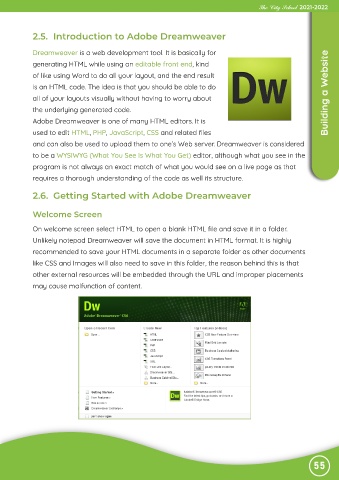
             On welcome screen select HTML to open a blank HTML file and save it in a folder.

             Unlikely notepad Dreamweaver will save the document in HTML format. It is highly
             recommended to save your HTML documents in a separate folder as other documents
             like CSS and Images will also need to save in this folder, the reason behind this is that

             other external resources will be embedded through the URL and improper placements

             may cause malfunction of content.


                                                                                                               55

