


Page 122 - Learn to Program - Basic-256
P. 122
Chapter 9: Custom Graphics – Creating Your Own Shapes.                          Page 106


        Chapter 9: Custom Graphics – Creating Your

               Own Shapes.


               This chapter we will show you how to draw colorful words and special shapes
               on your graphics window. Several topics will be covered, including: fancy
               text; drawing polygons on the graphics output area; and stamps, where we
               can position, re-size, and rotate polygons. You also will be introduced to
               angles and how to measure them in radians.


        Fancy Text for Graphics Output:


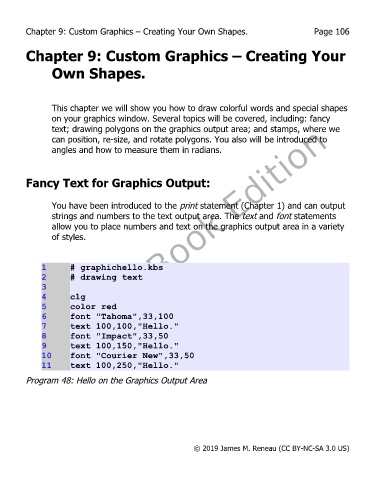
               You have been introduced to the print statement (Chapter 1) and can output
               strings and numbers to the text output area. The text and font statements
               allow you to place numbers and text on the graphics output area in a variety
               of styles.


             1      # graphichello.kbs
             2      # drawing text
             3
             4      clg
             5      color red
             6      font "Tahoma",33,100
             7      text 100,100,"Hello."
             8      font "Impact",33,50
             9      text 100,150,"Hello."
             10     font "Courier New",33,50
             11     text 100,250,"Hello."
        Program 48: Hello on the Graphics Output Area


                                                       © 2019 James M. Reneau (CC BY-NC-SA 3.0 US)

