


Page 142 - Learn to Program - Basic-256
P. 142
Chapter 9: Custom Graphics – Creating Your Own Shapes.                          Page 126


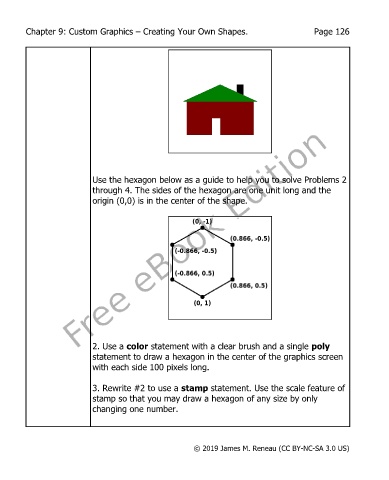
                           Use the hexagon below as a guide to help you to solve Problems 2
                           through 4. The sides of the hexagon are one unit long and the
                           origin (0,0) is in the center of the shape.


                           2. Use a color statement with a clear brush and a single poly
                           statement to draw a hexagon in the center of the graphics screen
                           with each side 100 pixels long.

                           3. Rewrite #2 to use a stamp statement. Use the scale feature of
                           stamp so that you may draw a hexagon of any size by only
                           changing one number.


                                                       © 2019 James M. Reneau (CC BY-NC-SA 3.0 US)

