


Page 124 - Super Scratch Programming Adventure -2nd Edition
P. 124
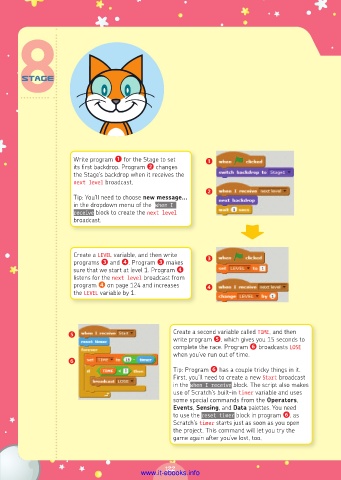
Write program ❶ for the Stage to set   ❶
                      its first backdrop. Program ❷ changes
                      the Stage’s backdrop when it receives the
                      next level broadcast.
                                                            ❷
                      Tip: You’ll need to choose new message...
                      in the dropdown menu of the  when I
                      receive block to create the next level
                      broadcast.


                      Create a LEVEL variable, and then write
                      programs ❸ and ❹. Program ❸ makes     ❸
                      sure that we start at level 1. Program ❹
                      listens for the next level broadcast from
                      program ❹ on page 124 and increases   ❹
                      the LEVEL variable by 1.


                     ❺                            Create a second variable called TIME, and then
                                                  write program ❺, which gives you 15 seconds to
                                                  complete the race. Program ❻ broadcasts LOSE
                                                  when you’ve run out of time.
                     ❻
                                                  Tip: Program ❻ has a couple tricky things in it.
                                                  First, you’ll need to create a new Start broadcast
                                                  in the when I receive block. The script also makes
                                                  use of Scratch’s built-in timer variable and uses
                                                  some special commands from the Operators,
                                                  Events, Sensing, and Data palettes. You need
                                                  to use the reset timer block in program ❻, as
                                                  Scratch’s timer starts just as soon as you open
                                                  the project. This command will let you try the
                                                  game again after you’ve lost, too.


                                                122
                                         www.it-ebooks.info

