


Page 151 - Super Scratch Programming Adventure -2nd Edition
P. 151
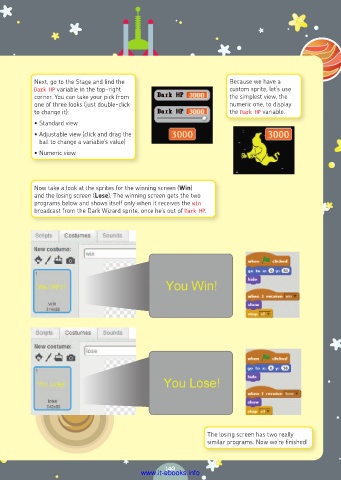
Next, go to the Stage and find the                     Because we have a
           Dark HP variable in the top-right                      custom sprite, let’s use
           corner. You can take your pick from                    the simplest view, the
           one of three looks (just double-click                  numeric one, to display
           to change it):                                         the Dark HP variable.
           • Standard view
           • Adjustable view (click and drag the
            ball to change a variable’s value)
           • Numeric view


           Now take a look at the sprites for the winning screen (Win)
           and the losing screen (Lose). The winning screen gets the two
           programs below and shows itself only when it receives the win
           broadcast from the Dark Wizard sprite, once he’s out of Dark HP.


                                                            The losing screen has two really
                                                            similar programs. Now we’re finished!


                                                149
                                         www.it-ebooks.info

