


Page 46 - Super Scratch Programming Adventure -2nd Edition
P. 46
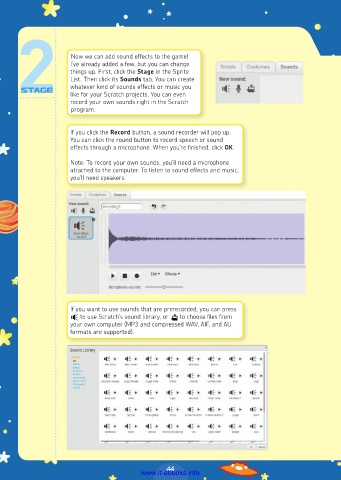
Now we can add sound effects to the game!
                     I’ve already added a few, but you can change
                     things up. First, click the Stage in the Sprite
                     List. Then click its Sounds tab. You can create
                     whatever kind of sounds effects or music you
                     like for your Scratch projects. You can even
                     record your own sounds right in the Scratch
                     program.


                     If you click the Record button, a sound recorder will pop up.
                     You can click the round button to record speech or sound
                     effects through a microphone. When you’re finished, click OK.
                     Note: To record your own sounds, you’ll need a microphone
                     attached to the computer. To listen to sound effects and music,
                     you’ll need speakers.


                     If you want to use sounds that are prerecorded, you can press
                        to use Scratch’s sound library, or    to choose files from
                     your own computer (MP3 and compressed WAV, AIF, and AU
                     formats are supported).


                                                 44
                                         www.it-ebooks.info

