


Page 68 - Super Scratch Programming Adventure -2nd Edition
P. 68
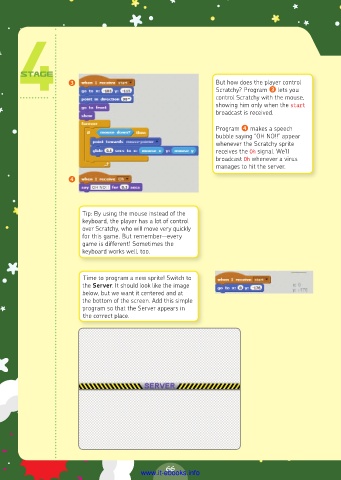
❸                                         But how does the player control
                                                               Scratchy? Program ❸ lets you
                                                               control Scratchy with the mouse,
                                                               showing him only when the start
                                                               broadcast is received.

                                                               Program ❹ makes a speech
                                                               bubble saying “OH NO!!” appear
                                                               whenever the Scratchy sprite
                                                               receives the Oh signal. We’ll
                                                               broadcast Oh whenever a virus
                                                               manages to hit the server.
                     ❹


                         Tip: By using the mouse instead of the
                         keyboard, the player has a lot of control
                         over Scratchy, who will move very quickly
                         for this game. But remember—every
                         game is different! Sometimes the
                         keyboard works well, too.


                         Time to program a new sprite! Switch to
                         the Server. It should look like the image
                         below, but we want it centered and at
                         the bottom of the screen. Add this simple
                         program so that the Server appears in
                         the correct place.


                                                66
                                         www.it-ebooks.info

