


Page 59 - Super Scratch Programming Adventure -1st Edition
P. 59
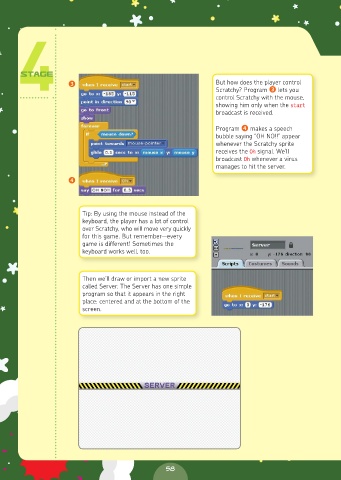
❸                                         But how does the player control
                                                               Scratchy? Program ❸ lets you
                                                               control Scratchy with the mouse,
                                                               showing him only when the start
                                                               broadcast is received.
                                                               Program ❹ makes a speech
                                                               bubble saying “OH NO!!” appear
                                                               whenever the Scratchy sprite
                                                               receives the Oh signal. We’ll
                                                               broadcast Oh whenever a virus
                                                               manages to hit the server.
                     ❹


                         Tip: By using the mouse instead of the
                         keyboard, the player has a lot of control
                         over Scratchy, who will move very quickly
                         for this game. But remember—every
                         game is different! Sometimes the
                         keyboard works well, too.


                         Then we’ll draw or import a new sprite
                         called Server. The Server has one simple
                         program so that it appears in the right
                         place: centered and at the bottom of the
                         screen.


                                                58

