


Page 258 - Scratch Programming Playground
P. 258
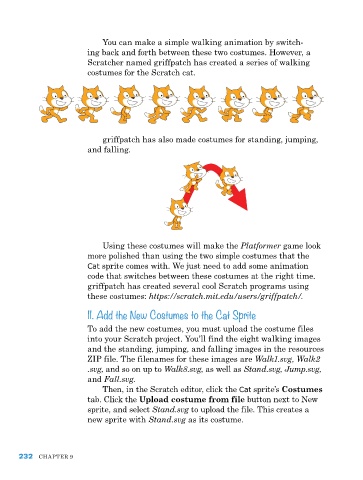
You can make a simple walking animation by switch-
                         ing back and forth between these two costumes. however, a
                         Scratcher named griffpatch has created a series of walking
                         costumes for the Scratch cat.


                             griffpatch has also made costumes for standing, jumping,
                         and falling.


                             Using these costumes will make the Platformer game look
                         more polished than using the two simple costumes that the
                         Cat sprite comes with. We just need to add some animation
                         code that switches between these costumes at the right time.
                         griffpatch has created several cool Scratch programs using
                         these costumes: https://scratch.mit.edu/users/griffpatch/.
                         11. Add the New Costumes to the Cat Sprite

                         to add the new costumes, you must upload the costume files
                         into your Scratch project. You’ll find the eight walking images
                         and the standing, jumping, and falling images in the resources
                         ZIp file. the filenames for these images are Walk1.svg, Walk2
                         .svg, and so on up to Walk8.svg, as well as Stand.svg, Jump.svg,
                         and Fall.svg.
                              then, in the Scratch editor, click the Cat sprite’s Costumes
                         tab. Click the Upload costume from file button next to New
                         sprite, and select Stand.svg to upload the file. this creates a
                         new sprite with Stand.svg as its costume.


      232   Chapter 9

