


Page 233 - Programming With Python 3
P. 233
An Introduction to STEM Programming with Python — 2019-09-03a                              Page 220
            Bonus Chapter 2 — Flow Charting

            4 — Put a coin or bill into the machine.
            5 — Have you inserted money enough to make the purchase?
             Free
                    Yes: Follow the arrow to #6.
                    No: Follow the arrow to #4 and insert more money.
            6 — Make a selection.
            7 — Is your selection is sold-out?
                    Yes: Follow the arrow back to #6 and make another selection.
                    No: Follow the arrow to #8.
             eBook
            8 — Remove your drink from the machine.
            9 — Remove any change from the machine.
            10 — We are done.

            The picture was not quite worth a thousand words but...

             Edition
            Most Common Symbols


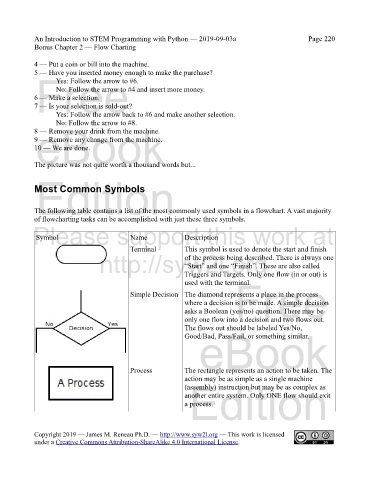
            The following table contains a list of the most commonly used symbols in a flowchart. A vast majority
            of flowcharting tasks can be accomplished with just these three symbols.
            Please support this work at
                                            Name
                                                              Description
             Symbol
                                            Terminal          This symbol is used to denote the start and finish
                                  http://syw2l.org
                                                              of the process being described. There is always one
                                                              “Start” and one “Finish”. These are also called
                                                              Triggers and Targets. Only one flow (in or out) is
                                                                               Free
                                                              used with the terminal.
                                            Simple Decision The diamond represents a place in the process
                                                              where a decision is to be made. A simple decision
                                                              asks a Boolean (yes/no) question. There may be
                                                              only one flow into a decision and two flows out.
                                                              The flows out should be labeled Yes/No,
                                                                   eBook
                                                              Good/Bad, Pass/Fail, or something similar.


                                            Process           The rectangle represents an action to be taken. The
                                                              action may be as simple as a single machine
                                                                Edition
                                                              (assembly) instruction but may be as complex as
                                                              another entire system. Only ONE flow should exit
                                                              a process.


            Copyright 2019 — James M. Reneau Ph.D. — http://www.syw2l.org — This work is licensed
            under a Creative Commons Attribution-ShareAlike 4.0 International License.

