


Page 35 - MuseScore 2.0 handbook
P. 35
1: 64th (hemidemisemiquaver)
             2: 32nd (demisemiquaver)
             3: 16th (semiquaver)
             4: Eighth (quaver)
             5: Quarter (crotchet)
             6: Half (minim)
             7: Whole (semibreve)
             8: Double whole (breve)
             9: Longa
             .: A period (dot) changes the selected duration into a dotted note/rest

         Step 4: Enter pitch (or rest)

         For all instruments (except unpitched percussion), you can add note pitches using the mouse by clicking directly on the
         staff. (For instructions specific to percussion see Drum notation). However, you may find it quicker to use a MIDI keyboard
         (see below), or your alphabetical computer keyboard. The following examples use the latter method.

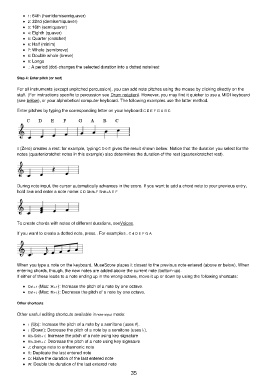
         Enter pitches by typing the corresponding letter on your keyboard: C D E F G A B C


         0 (Zero) creates a rest: for example, typing C D 0 E gives the result shown below. Notice that the duration you select for the
         notes (quarter/crotchet notes in this example) also determines the duration of the rest (quarter/crotchet rest).


         During note input, the cursor automatically advances in the score. If you want to add a chord note to your previous entry,
         hold Shift and enter a note name: C D Shift+F Shift+A E F


         To create chords with notes of different durations, see Voices.

         If you want to create a dotted note, press .. For example 5 . C 4 D E F G A


         When you type a note on the keyboard, MuseScore places it closest to the previous note entered (above or below). When
         entering chords, though, the new notes are added above the current note (bottom-up).
         If either of these leads to a note ending up in the wrong octave, move it up or down by using the following shortcuts:

             Ctrl+↑ (Mac: ⌘+↑): Increase the pitch of a note by one octave.
             Ctrl+↓ (Mac: ⌘+↓): Decrease the pitch of a note by one octave.

         Other shortcuts

         Other useful editing shortcuts available in note input mode:

             ↑ (Up): Increase the pitch of a note by a semitone (uses ♯).
             ↓ (Down): Decrease the pitch of a note by a semitone (uses ♭).
             Alt+Shift+↑: Increase the pitch of a note using key signature
             Alt+Shift+↓: Decrease the pitch of a note using key signature
             J: change note to enharmonic note
             R: Duplicate the last entered note
             Q: Halve the duration of the last entered note
             W: Double the duration of the last entered note
                                                           35

