


Page 32 - Google-Cheat-Sheets-eBook
P. 32
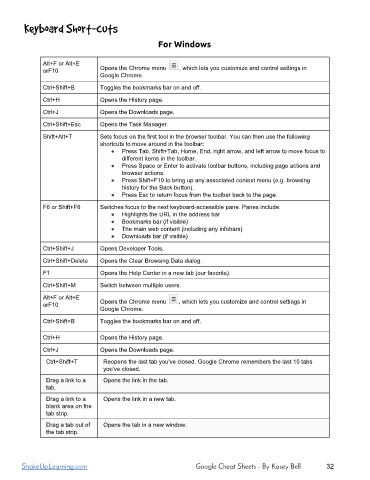
For Windows
Alt+F or Alt+E
orF10 Opens the Chrome menu , which lets you customize and control settings in
Google Chrome.
Ctrl+Shift+B Toggles the bookmarks bar on and off.
Ctrl+H Opens the History page.
Ctrl+J Opens the Downloads page.
Ctrl+Shift+Esc Opens the Task Manager.
Shift+Alt+T Sets focus on the first tool in the browser toolbar. You can then use the following
shortcuts to move around in the toolbar:
● Press Tab, Shift+Tab, Home, End, right arrow, and left arrow to move focus to
different items in the toolbar.
● Press Space or Enter to activate toolbar buttons, including page actions and
browser actions.
● Press Shift+F10 to bring up any associated context menu (e.g. browsing
history for the Back button).
● Press Esc to return focus from the toolbar back to the page.
F6 or Shift+F6 Switches focus to the next keyboardaccessible pane. Panes include:
● Highlights the URL in the address bar
● Bookmarks bar (if visible)
● The main web content (including any infobars)
● Downloads bar (if visible)
Ctrl+Shift+J Opens Developer Tools.
Ctrl+Shift+Delete Opens the Clear Browsing Data dialog.
F1 Opens the Help Center in a new tab (our favorite).
Ctrl+Shift+M Switch between multiple users.
Alt+F or Alt+E
orF10 Opens the Chrome menu , which lets you customize and control settings in
Google Chrome.
Ctrl+Shift+B Toggles the bookmarks bar on and off.
Ctrl+H Opens the History page.
Ctrl+J Opens the Downloads page.
Ctrl+Shift+T Reopens the last tab you've closed. Google Chrome remembers the last 10 tabs
you've closed.
Drag a link to a Opens the link in the tab.
tab.
Drag a link to a Opens the link in a new tab.
blank area on the
tab strip.
Drag a tab out of Opens the tab in a new window.
the tab strip.
ShakeUpLearning.com Google Cheat Sheets - By Kasey Bell 32

