


Page 59 - Owners
P. 59
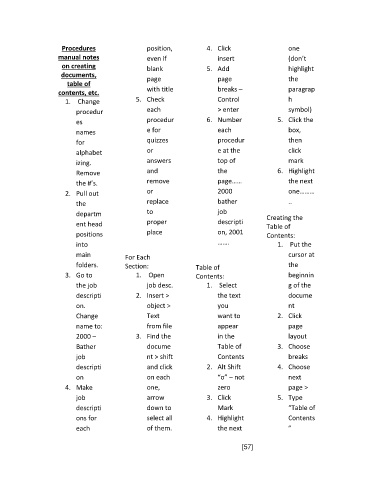
Procedures                   position,          4.  Click                  one
                    manual notes                  even if                insert                 (don’t
                     on creating                  blank              5.  Add                    highlight
                     documents,
                                                  page                   page                   the
                       table of
                                                  with title             breaks –               paragrap
                    contents, etc.
                       1.   Change            5.  Check                  Control                h
                          procedur                each                   > enter                symbol)
                          es                      procedur           6.  Number              5.  Click the

                          names                   e for                  each                   box,
                          for                     quizzes                procedur               then
                          alphabet                or                     e at the               click
                          izing.                  answers                top of                 mark
                          Remove                  and                    the                 6.  Highlight
                          the #’s.                remove                 page……                 the next
                       2.  Pull out               or                     2000                   one………
                          the                     replace                bather                 ..

                          departm                 to                     job             Creating the
                          ent head                proper                 descripti       Table of
                          positions               place                  on, 2001        Contents:
                          into                                           …….                 1.   Put the

                          main            For Each                                              cursor at
                          folders.        Section:                Table of                      the
                       3.  Go to              1.   Open           Contents:                     beginnin
                          the job                 job desc.          1.   Select                g of the
                          descripti           2.  Insert >               the text               docume
                          on.                     object >               you                    nt
                          Change                  Text                   want to             2.  Click

                          name to:                from file              appear                 page
                          2000 –              3.  Find the               in the                 layout
                          Bather                  docume                 Table of            3.  Choose
                          job                     nt > shift             Contents               breaks
                          descripti               and click          2.  Alt Shift           4.  Choose
                          on                      on each                “o” – not              next
                       4.  Make                   one,                   zero                   page >
                          job                     arrow              3.  Click               5.  Type

                          descripti               down to                Mark                   “Table of
                          ons for                 select all         4.  Highlight              Contents
                          each                    of them.               the next               ”

                                                                                 [57]

