


Page 56 - Computing E-Book Grade 7
P. 56
The City School  2021-2022


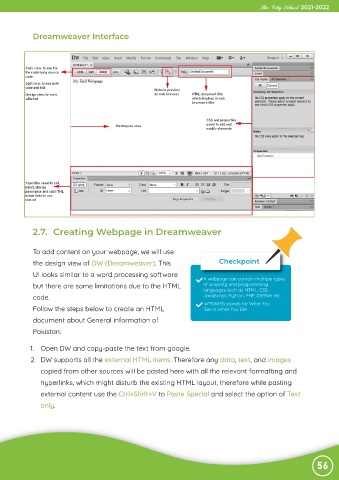
             Dreamweaver Interface


             2.7.  Creating Webpage in Dreamweaver


             To add content on your webpage, we will use
             the design view of DW (Dreamweaver). This                        Checkpoint

             UI looks similar to a word processing software             A webpage can contain multiple types

             but there are some limitations due to the HTML             of scripting and programming
                                                                        languages such as HTML, CSS,
             code.                                                      JavaScript, Python, PHP, ASP.Net etc.
                                                                         WYSIWYG stands for What You
             Follow the steps below to create an HTML                    See Is What You Get
             document about General information of

             Pakistan:

            1.  Open DW and copy-paste the text from google.

            2.  DW supports all the external HTML items. Therefore any data, text, and images
               copied from other sources will be pasted here with all the relevant formatting and

               hyperlinks, which might disturb the existing HTML layout, therefore while pasting
               external content use the Ctrl+Shift+V to Paste Special and select the option of Text

               only.


                                                                                                                56

