


Page 66 - Computing E-Book Grade 7
P. 66
The City School  2021-2022


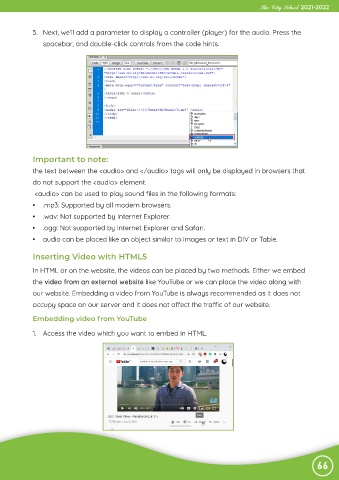
             5.  Next, we’ll add a parameter to display a controller (player) for the audio. Press the
                spacebar, and double-click controls from the code hints.


             Important to note:
             the text between the <audio> and </audio> tags will only be displayed in browsers that

             do not support the <audio> element.
              <audio> can be used to play sound files in the following formats:

             •  .mp3: Supported by all modern browsers.
             •  .wav: Not supported by Internet Explorer.

             •  .ogg: Not supported by Internet Explorer and Safari.
             •  audio can be placed like an object similar to images or text in DIV or Table.


             Inserting Video with HTML5

             In HTML or on the website, the videos can be placed by two methods. Either we embed

             the video from an external website like YouTube or we can place the video along with
             our website. Embedding a video from YouTube is always recommended as it does not

             occupy space on our server and it does not affect the traffic of our website.

             Embedding video from YouTube

             1.  Access the video which you want to embed in HTML.


                                                                                                                66

