


Page 78 - Windows 10 May 2019 Update The Missing Manual: The Book That Should Have Been in the Box
P. 78
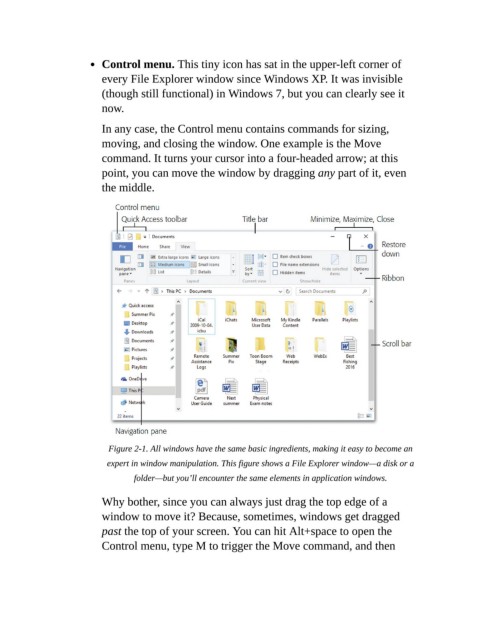
Control menu. This tiny icon has sat in the upper-left corner of

                           every File Explorer window since Windows XP. It was invisible
                           (though still functional) in Windows 7, but you can clearly see it
                           now.

                           In any case, the Control menu contains commands for sizing,

                           moving, and closing the window. One example is the Move
                           command. It turns your cursor into a four-headed arrow; at this
                           point, you can move the window by dragging any part of it, even

                           the middle.


                             Figure 2-1. All windows have the same basic ingredients, making it easy to become an
                            expert in window manipulation. This figure shows a File Explorer window—a disk or a
                                   folder—but you’ll encounter the same elements in application windows.


                           Why bother, since you can always just drag the top edge of a
                           window to move it? Because, sometimes, windows get dragged

                           past the top of your screen. You can hit Alt+space to open the
                           Control menu, type M to trigger the Move command, and then

