


Page 85 - OXFORD - Family and Friends 4 Class Book (2nd Edition)
P. 85
I d§.t.ii,[.j


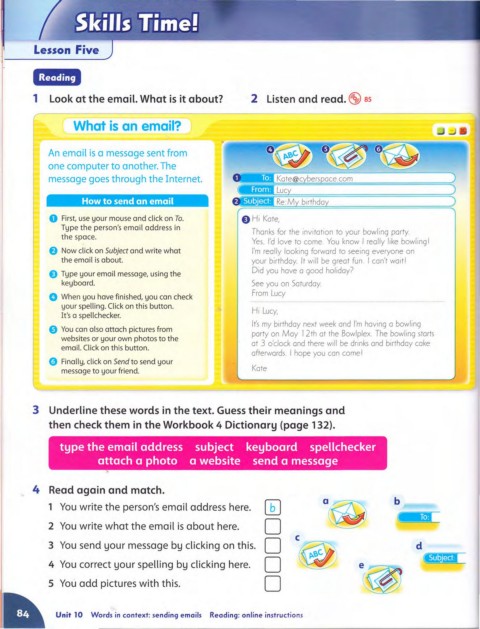
         1  Look at the email. What is it about?               2  Listen and read. t.Sl85


                   What is an email?


             An email is a message sent from
             one computer to another. The
             message goes through the Internet.


                     How to send an email

             o First, use your mouse and click on To.        E) HI  Kote,
                Type the person's email address in
                                                                Thonks  for the Invitation to your bowling  porty.
                the space.
                                                                Yes,  I'd  love to come.  You  know  I reolly like bowllng l
             e Now click on Subject and write what              I'm  really looking  forward  to seeing  everyone on
                the email is about.                             your birthdoy.  It will  be greot fun  I con't wait I
                                                                Did you  have a good holiday?
             E)  Type your email message, using the
                keyboard.                                       See  you on  Saturday
                                                                From Lucy
             o When you have finished, you can check
                your spelling. Click on this button.
                                                                Hi  Lucy,
                It's a spellchecker.
                                                                It's  my  birthday next week and  I'm  having a bowling
             e You can also attach pictures from
                                                                party on  May  12th at the  Bowlplex  The  bowling  starts
                websites or your own photos to the
                                                                at 3  o'clock and  there will  be drinks and  birthday cake
                email.Click on this button.
                                                                afterwards  I hope you can come I
             o Finally, click on Send to send your
                message to your friend.                         Kate


         3  Underline these words in the text. Guess their meanings and
             then check them in the Workbook 4 Dictionary (page 132).


                type the email address  subject  keyboard  spellchecker
                         attach a photo  a website  send a message


         4  Read again and match.
                                                                   W             a~
             1  You  write the person's email address here.                                        b
                                                                   0
             2  You write what the email is  about here.
                                                                   0                                    d
             3  You  send your message by clicking on this.               c
                                                                   0                      e~
             4  You  correct your spelling by clicking here.               ~
                                                                   0
             5  You add pictures with this.


               Unit 10  Words in  context: sending emails   Reading: on line instructions

