


Page 329 - (ISC)² CISSP Certified Information Systems Security Professional Official Study Guide
P. 329
Erasing Erasing media is simply performing a delete operation
               against a file, a selection of files, or the entire media. In most cases, the

               deletion or removal process removes only the directory or catalog link
               to the data. The actual data remains on the drive. As new files are
               written to the media, the system eventually overwrites the erased data,
               but depending on the size of the drive, how much free space it has, and
               several other factors, the data may not be overwritten for months.
               Anyone can typically retrieve the data using widely available undelete
               tools.


               Clearing Clearing, or overwriting, is a process of preparing media
               for reuse and ensuring that the cleared data cannot be recovered using
               traditional recovery tools. When media is cleared, unclassified data is
               written over all addressable locations on the media. One method
               writes a single character, or a specific bit pattern, over the entire
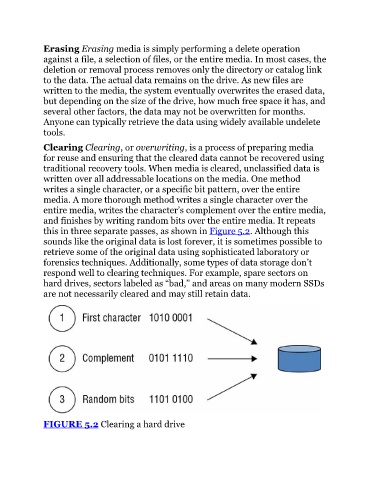
               media. A more thorough method writes a single character over the
               entire media, writes the character’s complement over the entire media,

               and finishes by writing random bits over the entire media. It repeats
               this in three separate passes, as shown in Figure 5.2. Although this
               sounds like the original data is lost forever, it is sometimes possible to
               retrieve some of the original data using sophisticated laboratory or
               forensics techniques. Additionally, some types of data storage don’t

               respond well to clearing techniques. For example, spare sectors on
               hard drives, sectors labeled as “bad,” and areas on many modern SSDs
               are not necessarily cleared and may still retain data.


               FIGURE 5.2 Clearing a hard drive

