


Page 93 - Computing book 6
P. 93
Minecraft                                                                            Class 6


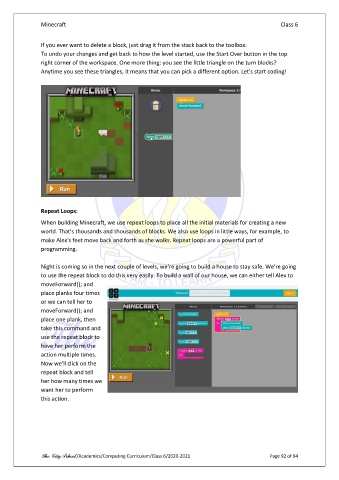
               If you ever want to delete a block, just drag it from the stack back to the toolbox.
               To undo your changes and get back to how the level started, use the Start Over button in the top
               right corner of the workspace. One more thing: you see the little triangle on the turn blocks?
               Anytime you see these triangles, it means that you can pick a different option. Let's start coding!


               Repeat Loops:
               When building Minecraft, we use repeat loops to place all the initial materials for creating a new
               world. That's thousands and thousands of blocks. We also use loops in little ways, for example, to
               make Alex's feet move back and forth as she walks. Repeat loops are a powerful part of
               programming.

               Night is coming so in the next couple of levels, we're going to build a house to stay safe. We're going
               to use the repeat block to do this very easily. To build a wall of our house, we can either tell Alex to
               moveForward(); and
               place planks four times
               or we can tell her to
               moveForward(); and
               place one plank, then
               take this command and
               use the repeat block to
               have her perform the
               action multiple times.
               Now we'll click on the
               repeat block and tell
               her how many times we
               want her to perform
               this action.


               The City School /Academics/Computing Curriculum/Class 6/2020-2021                Page 92 of 94

