


Page 203 - MODUL PEMBELAJARAN MPV PRODUKSI MULTIMEDIA T4
P. 203
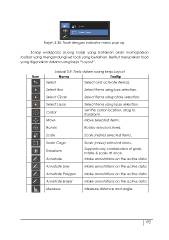
Rajah 3.30: Tools dengan indicator menu pop up.

         Setiap workspace (ruang kerja) yang berlainan akan memaparkan
toolbar yang mengandungi set tools yang berlainan. Berikut merupakan tools
yang digunakan dalam ruang kerja “Layout”.

      Jadual 3.9: Tools dalam ruang kerja Layout

Ikon          Nama     Tooltip

      Select           Select and activate item(s).

      Select Box       Select items using box selection.

      Select Circle    Select items using circle selection.

      Select Lasso     Select items using lasso selection.
      Cursor
      Move             Set the cursor location, drag to
                       transform.

                       Move selected items.

      Rotate           Rotate selected items.

      Scale            Scale (resize) selected items.

      Scale Cage       Scale (resize) selected items.
      Transform
      Annotate         Supports any combination of grab,
                       rotate & scale at once.

                       Make annotations on the active data

      Annotate Line    Make annotations on the active data

      Annotate Polygon Make annotations on the active data

      Annotate Eraser  Make annotations on the active data

      Measure          Measure distance and angle.

                                                             192

