


Page 50 - fjs-genero-3.00.02-manual-install_Neat
P. 50
License Genero Business Development Language | 49


                    License status updated:

                    •  The Licensing status field is updated: “temporary information stored” has been replaced with
                       “License installation successful”.
                    •  In the field under Licensing status you will see the maintenance expiry date appears after the End
                       of maintenance date: This means that your maintenance key is valid until the date displayed.
                    Your product is now fully licensed.
                 3. Select Quit to exit the dialog.

            License an upgraded installation

                 It is not necessary to re-enter the license of the product if the new version:
                 •  Is installed into an existing installation directory
                 •  Is not a major version number change
                 You will need to enter a new maintenance key if the build date of the Genero Business Development
                 Language (BDL) package is greater than the end of maintenance date (encoded in the maintenance key).


            License Genero using the Four Js License Manager (FLM)

                 How to set up a Genero Business Development Language (BDL) product installation to use a license
                 manager on the network.

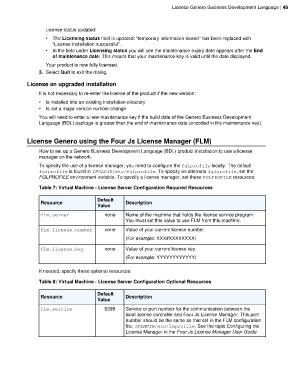
                 To specify the use of a license manager, you need to configure the fglprofile locally. The default
                 fglprofile is found in $FGLDIR/etc/fglprofile. To specify an alternate fglprofile, set the
                 FGLPROFILE environment variable. To specify a license manager, set these FGLPROFILE resources:
                 Table 7: Virtual Machine - License Server Configuration Required Resources


                                          Default
                  Resource                            Description
                                          Value
                  flm.server                 none     Name of the machine that holds the license service program.
                                                      You must set this value to use FLM from this machine.

                  flm.license.number         none     Value of your current license number.
                                                      (For example: XXX#XXXXXXXX)
                  flm.license.key            none     Value of your current license key.

                                                      (For example: YYYYYYYYYYYY)

                 If needed, specify these optional resources:

                 Table 8: Virtual Machine - License Server Configuration Optional Resources

                                          Default
                  Resource                            Description
                                          Value
                  flm.service                6399     Service or port number for the communication between the
                                                      local license controller and Four Js License Manager. This port
                                                      number should be the same as that set in the FLM configuration
                                                      file, $FLMDIR/etc/lmprofile. See the topic Configuring the
                                                      License Manager in the Four Js License Manager User Guide

