


Page 510 - How to Make Money in Stocks Trilogy
P. 510
How I Use IBD to Find Potential Winning Stocks 379


          create different lists for different purposes. For example, you could
          create a “My Portfolio” list for the stocks you own, a list of “Stocks in
          Bases” for leading stocks that are currently forming a base, and a “Near
          a Buy Point” list for stocks that are approaching a proper buy point. It’s
          important that you review and manage your lists regularly, adding and
          deleting stocks as needed.
            To help you track the performance of your stocks, the “My Biggest Price
          Movers” feature automatically alerts you to the stocks on your lists that are
          making the biggest price moves, up or down.
            “My Stock Lists” also gives you one-click access to “IBD Stock
          Checkup,” IBD charts, and IBD archives for each stock. Use IBD archives
          to read what IBD has written about the companies you’re watching; it can
          provide valuable insight into the story behind the stock. Use “IBD Stock
          Checkup” and IBD charts to continually evaluate both the stocks you own
          and those you’re watching.


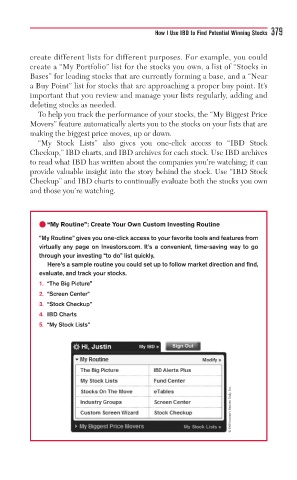
            • “My Routine”: Create Your Own Custom Investing Routine

            “My Routine” gives you one-click access to your favorite tools and features from
            virtually any page on Investors.com. It’s a convenient, time-saving way to go
            through your investing “to do” list quickly.
              Here’s a sample routine you could set up to follow market direction and find,
            evaluate, and track your stocks.
            1. “The Big Picture”
            2. “Screen Center”
            3. “Stock Checkup”
            4. IBD Charts
            5. “My Stock Lists”


                                                                © 2009 Investor’s Business Daily, Inc.

