


Page 27 - TCS ICT Book 6
P. 27
The City School  2021-2022


             Adding Legends to Charts


             Most charts use some kind of a legend to help readers understand the charted
             data. Whenever you create a chart in Excel, a legend for the chart is automatically

             generated at the same time. A chart can be missing a legend if it has been manually
             removed from the chart, but you can retrieve the missing legend.                                       Analysing Data


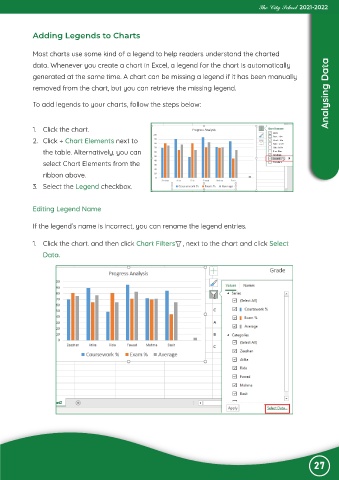
             To add legends to your charts, follow the steps below:


             1.  Click the chart.

             2.  Click + Chart Elements next to
                the table. Alternatively, you can

                select Chart Elements from the
                ribbon above.

             3.  Select the Legend checkbox.


             Editing Legend Name

             If the legend’s name is incorrect, you can rename the legend entries.


             1.  Click the chart. and then click Chart Filters    , next to the chart and click Select

                Data.


                                                                                                               27

