


Page 250 - Learn To Program With Scratch
P. 250
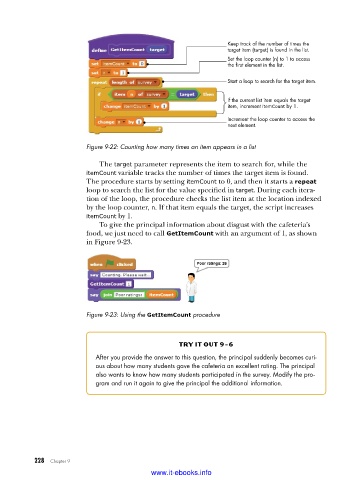
Keep track of the number of times the
                                                                target item (target) is found in the list.
                                                                Set the loop counter (n) to 1 to access
                                                                the first element in the list.

                                                                Start a loop to search for the target item.

                                                                If the current list item equals the target
                                                                item, increment itemCount by 1.
                                                                Increment the loop counter to access the
                                                                next element.


                         Figure 9-22: Counting how many times an item appears in a list

                             The target parameter represents the item to search for, while the
                         itemCount variable tracks the number of times the target item is found.
                         The procedure starts by setting itemCount to 0, and then it starts a repeat
                         loop to search the list for the value specified in target. During each itera-
                         tion of the loop, the procedure checks the list item at the location indexed
                         by the loop counter, n. If that item equals the target, the script increases
                         itemCount by 1.
                             To give the principal information about disgust with the cafeteria’s
                         food, we just need to call GetItemCount with an argument of 1, as shown
                         in Figure 9-23.


                         Figure 9-23: Using the GetItemCount procedure


                                                   try it out 9-6
                            After you provide the answer to this question, the principal suddenly becomes curi-
                            ous about how many students gave the cafeteria an excellent rating . The principal
                            also wants to know how many students participated in the survey . Modify the pro-
                            gram and run it again to give the principal the additional information .


           228   Chapter 9
                                           www.it-ebooks.info

