


Page 249 - Learn To Program With Scratch
P. 249
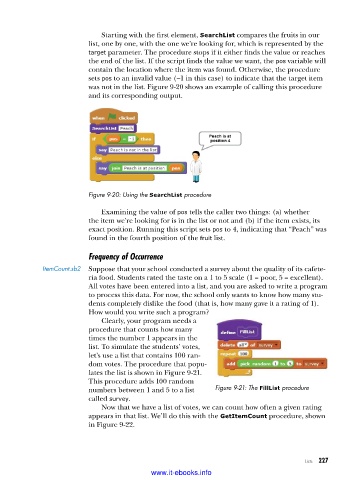
Starting with the first element, SearchList compares the fruits in our
                          list, one by one, with the one we’re looking for, which is represented by the
                          target parameter. The procedure stops if it either finds the value or reaches
                          the end of the list. If the script finds the value we want, the pos variable will
                          contain the location where the item was found. Otherwise, the procedure
                          sets pos to an invalid value (–1 in this case) to indicate that the target item
                          was not in the list. Figure 9-20 shows an example of calling this procedure
                          and its corresponding output.


                          Figure 9-20: Using the SearchList procedure

                             Examining the value of pos tells the caller two things: (a) whether
                          the item we’re looking for is in the list or not and (b) if the item exists, its
                          exact position. Running this script sets pos to 4, indicating that “Peach” was
                          found in the fourth position of the fruit list.


                          Frequency of Occurrence
             ItemCount .sb2  Suppose that your school conducted a survey about the quality of its cafete-
                          ria food. Students rated the taste on a 1 to 5 scale (1 = poor, 5 = excellent).
                          All votes have been entered into a list, and you are asked to write a program
                          to process this data. For now, the school only wants to know how many stu-
                          dents completely dislike the food (that is, how many gave it a rating of 1).
                          How would you write such a program?
                             Clearly, your program needs a
                          procedure that counts how many
                          times the number 1 appears in the
                          list. To simulate the students’ votes,
                          let’s use a list that contains 100 ran-
                          dom votes. The procedure that popu-
                          lates the list is shown in Figure 9-21.
                          This procedure adds 100 random
                          numbers between 1 and 5 to a list   Figure 9-21: The FillList procedure
                          called survey.
                             Now that we have a list of votes, we can count how often a given rating
                          appears in that list. We’ll do this with the GetItemCount procedure, shown
                          in Figure 9-22.


                                                                                      Lists   227

                                           www.it-ebooks.info

