


Page 29 - Learn To Use HTML and CSS
P. 29
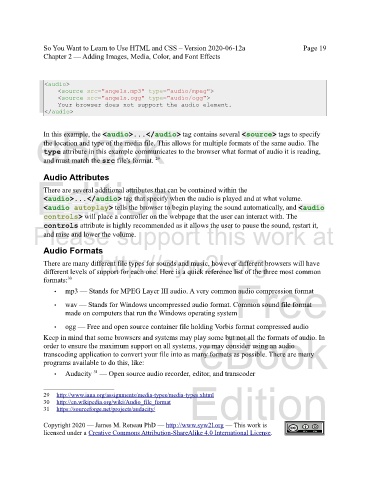
So You Want to Learn to Use HTML and CSS – Version 2020-06-12a                        Page 19
               Chapter 2 — Adding Images, Media, Color, and Font Effects


             Free
                <audio>
                    <source src="angels.mp3" type="audio/mpeg">
                    <source src="angels.ogg" type="audio/ogg">
                    Your browser does not support the audio element.
                </audio>

             eBook
               In this example, the <audio>...</audio> tag contains several <source> tags to specify
               the location and type of the media file. This allows for multiple formats of the same audio. The
               type attribute in this example communicates to the browser what format of audio it is reading,
                                                    29
               and must match the src file's format.

               Audio Attributes
             Edition
               There are several additional attributes that can be contained within the
               <audio>...</audio> tag that specify when the audio is played and at what volume.
               <audio autoplay> tells the browser to begin playing the sound automatically, and <audio
               controls> will place a controller on the webpage that the user can interact with. The
               controls attribute is highly recommended as it allows the user to pause the sound, restart it,
            Please support this work at
               and raise and lower the volume.

               Audio Formats
                                  http://syw2l.org
               There are many different file types for sounds and music, however different browsers will have
               different levels of support for each one. Here is a quick reference list of the three most common
               formats: 30
                                                                               Free
                   •   mp3 — Stands for MPEG Layer III audio. A very common audio compression format
                   •   wav — Stands for Windows uncompressed audio format. Common sound file format
                       made on computers that run the Windows operating system

                   •   ogg — Free and open source container file holding Vorbis format compressed audio
                                                                   eBook
               Keep in mind that some browsers and systems may play some but not all the formats of audio. In
               order to ensure the maximum support on all systems, you may consider using an audio
               transcoding application to convert your file into as many formats as possible. There are many
               programs available to do this, like:
                                31
                   •   Audacity   — Open source audio recorder, editor, and transcoder
                                                                Edition

               29     http://www.iana.org/assignments/media-types/media-types.xhtml

               30   http://en.wikipedia.org/wiki/Audio_file_format
               31     https://sourceforge.net/projects/audacity/

               Copyright 2020 — James M. Reneau PhD — http://www.syw2l.org — This work is
               licensed under a Creative Commons Attribution-ShareAlike 4.0 International License.

