


Page 53 - Learn To Use HTML and CSS
P. 53
So You Want to Learn to Use HTML and CSS – Version 2020-06-12a                        Page 43
               Chapter 4 — Anchors and URLs

               destinstion. Here are some examples of external links:
             Free
                       http://www.yahoo.com — A link to the www server at Yahoo

                   •
                       http://www.cnn.com/WORLD/ — A link to CNN's World News folder

                   •

                       http://openclipart.org/assets/images/images/openclipart-

                   •
                       banner.png — a link to the banner picture in a sub-sub-folder at OpenClipart. Note
             eBook
                       the hierarchy of the folders in the link. The picture openclipart-banner.png is within the
                       folder images, which is within another folder titled images, which is within the folder
                       assets. All folders must be listed to properly target a URL.
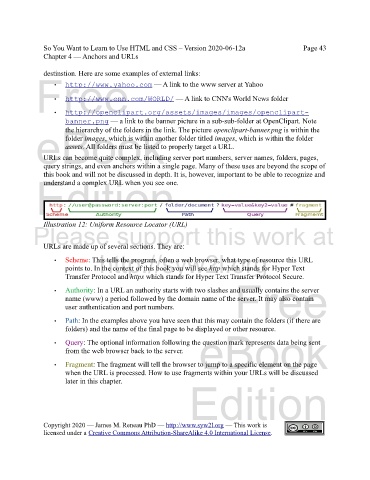
               URLs can become quite complex, including server port numbers, server names, folders, pages,
               query strings, and even anchors within a single page. Many of these uses are beyond the scope of
               this book and will not be discussed in depth. It is, however, important to be able to recognize and
             Edition
               understand a complex URL when you see one.


               Illustration 12: Uniform Resource Locator (URL)
            Please support this work at


               URLs are made up of several sections. They are:
                                  http://syw2l.org
                   •   Scheme: This tells the program, often a web browser, what type of resource this URL
                       points to. In the context of this book you will see http which stands for Hyper Text
                       Transfer Protocol and https which stands for Hyper Text Transfer Protocol Secure.
                                                                               Free
                   •   Authority: In a URL an authority starts with two slashes and usually contains the server
                       name (www) a period followed by the domain name of the server. It may also contain
                       user authentication and port numbers.


                   •   Path: In the examples above you have seen that this may contain the folders (if there are
                       folders) and the name of the final page to be displayed or other resource.

                   •   Query: The optional information following the question mark represents data being sent
                       from the web browser back to the server.    eBook

                   •   Fragment: The fragment will tell the browser to jump to a specific element on the page
                       when the URL is processed. How to use fragments within your URLs will be discussed
                       later in this chapter.
                                                                Edition


               Copyright 2020 — James M. Reneau PhD — http://www.syw2l.org — This work is
               licensed under a Creative Commons Attribution-ShareAlike 4.0 International License.

