


Page 41 - Learn to Program - Basic-256
P. 41
Chapter 2: Drawing Basic Shapes.                                                 Page 25


                   If you do not want to replace the old version of the program and you want to
                   store it using a new name you may use the Save As option on the File menu
                   to save a copy with a different name.


                   To load a previously saved program you would use the Open button               on
                   the tool bar or the Open option on the File menu.


            Drawing with Lines:


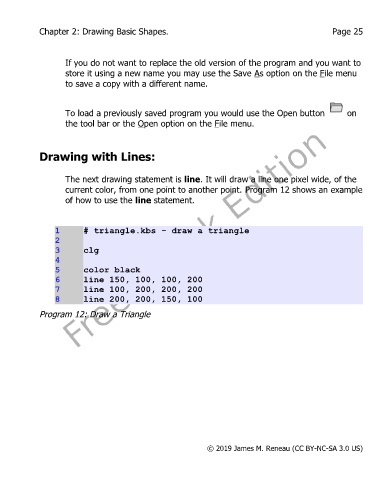
                   The next drawing statement is line. It will draw a line one pixel wide, of the
                   current color, from one point to another point. Program 12 shows an example
                   of how to use the line statement.


                1       # triangle.kbs - draw a triangle
                2
                3       clg
                4
                5       color black
                6       line 150, 100, 100, 200
                7       line 100, 200, 200, 200
                8       line 200, 200, 150, 100

            Program 12: Draw a Triangle


                                                           © 2019 James M. Reneau (CC BY-NC-SA 3.0 US)

