


Page 79 - Learn to Program - Basic-256
P. 79
Chapter 5: Thinking Like a Programmer                                            Page 63


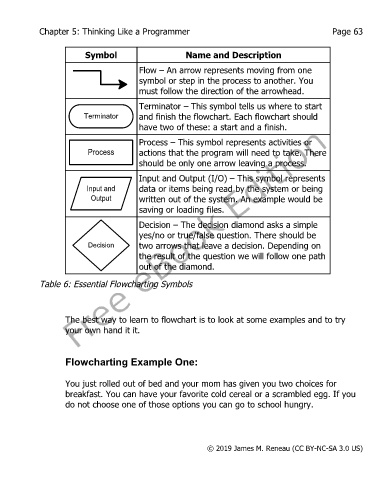
                         Symbol                      Name and Description
                                        Flow – An arrow represents moving from one
                                        symbol or step in the process to another. You
                                        must follow the direction of the arrowhead.

                                        Terminator – This symbol tells us where to start
                        Terminator      and finish the flowchart. Each flowchart should
                                        have two of these: a start and a finish.

                                        Process – This symbol represents activities or
                         Process        actions that the program will need to take. There
                                        should be only one arrow leaving a process.

                                        Input and Output (I/O) – This symbol represents
                         Input and      data or items being read by the system or being
                          Output        written out of the system. An example would be
                                        saving or loading files.

                                        Decision – The decision diamond asks a simple
                                        yes/no or true/false question. There should be
                         Decision       two arrows that leave a decision. Depending on
                                        the result of the question we will follow one path
                                        out of the diamond.

            Table 6: Essential Flowcharting Symbols


                   The best way to learn to flowchart is to look at some examples and to try
                   your own hand it it.


                   Flowcharting Example One:


                   You just rolled out of bed and your mom has given you two choices for
                   breakfast. You can have your favorite cold cereal or a scrambled egg. If you
                   do not choose one of those options you can go to school hungry.


                                                           © 2019 James M. Reneau (CC BY-NC-SA 3.0 US)

