


Page 81 - Super Scratch Programming Adventure -2nd Edition
P. 81
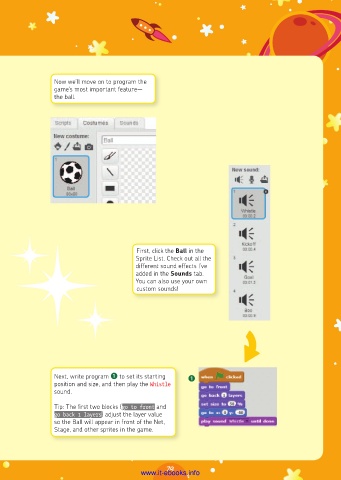
Now we’ll move on to program the
                game’s most important feature—
                the ball.


                                        First, click the Ball in the
                                        Sprite List. Check out all the
                                        different sound effects I’ve
                                        added in the Sounds tab.
                                        You can also use your own
                                        custom sounds!


                Next, write program ❶ to set its starting   ❶
                position and size, and then play the Whistle
                sound.

                Tip: The first two blocks (go to front and
                go back 1 layers) adjust the layer value
                so the Ball will appear in front of the Net,
                Stage, and other sprites in the game.


                                                 79
                                         www.it-ebooks.info

