


Page 82 - Super Scratch Programming Adventure -2nd Edition
P. 82
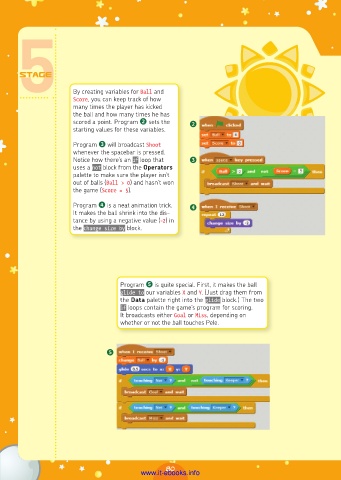
By creating variables for Ball and
                      Score, you can keep track of how
                      many times the player has kicked
                      the ball and how many times he has
                      scored a point. Program ❷ sets the   ❷
                      starting values for these variables.

                      Program ❸ will broadcast Shoot
                      whenever the spacebar is pressed.
                      Notice how there’s an if loop that   ❸
                      uses a not block from the Operators
                      palette to make sure the player isn’t
                      out of balls (Ball > 0) and hasn’t won
                      the game (Score = 5).

                      Program ❹ is a neat animation trick.   ❹
                      It makes the ball shrink into the dis-
                      tance by using a negative value (-2) in
                      the change size by block.


                                   Program ❺ is quite special. First, it makes the ball
                                   glide to our variables X and Y. (Just drag them from
                                   the Data palette right into the glide block.) The two
                                   if loops contain the game’s program for scoring.
                                   It broadcasts either Goal or Miss, depending on
                                   whether or not the ball touches Pele.


                               ❺


                                                80
                                         www.it-ebooks.info

