


Page 129 - Super Scratch Programming Adventure -1st Edition
P. 129
❽
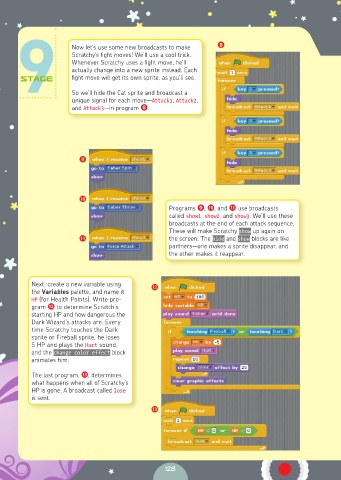
                      Now let’s use some new broadcasts to make
                      Scratchy’s fight moves! We’ll use a cool trick.
                      Whenever Scratchy uses a fight move, he’ll
                      actually change into a new sprite instead. Each
                      fight move will get its own sprite, as you’ll see.

                      So we’ll hide the Cat sprite and broadcast a
                      unique signal for each move—Attack1, Attack2,
                      and Attack3—in program ❽.


                        ❾


                        ❿
                                                 Programs ❾, ❿, and ⓫ use broadcasts
                                                 called show1, show2, and show3. We’ll use these
                                                 broadcasts at the end of each attack sequence.
                                                 These will make Scratchy show up again on
                        ⓫                        the screen. The hide and show blocks are like
                                                 partners—one makes a sprite disappear, and
                                                 the other makes it reappear.


          Next, create a new variable using   ⓬
          the Variables palette, and name it
          HP (for Health Points). Write pro-
          gram ⓬ to determine Scratch’s
          starting HP and how dangerous the
          Dark Wizard’s attacks are. Every
          time Scratchy touches the Dark
          sprite or Fireball sprite, he loses
          5 HP and plays the Hurt sound,
          and the change color effect block
          animates him.
          The last program, ⓭, determines
          what happens when all of Scratchy’s
          HP is gone: A broadcast called lose
          is sent.
                                            ⓭


                                                128

