


Page 131 - Super Scratch Programming Adventure -1st Edition
P. 131
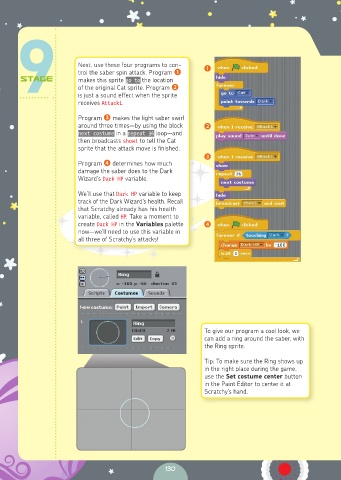
Next, use these four programs to con-  ❶
                       trol the saber spin attack. Program ❶
                       makes this sprite go to the location
                       of the original Cat sprite. Program ❷
                       is just a sound effect when the sprite
                       receives Attack1.
                       Program ❸ makes the light saber swirl
                       around three times—by using the block   ❷
                       next costume in a repeat 36 loop—and
                       then broadcasts show1 to tell the Cat
                       sprite that the attack move is finished.
                                                           ❸
                       Program ❹ determines how much
                       damage the saber does to the Dark
                       Wizard’s Dark HP variable.

                       We’ll use that Dark HP variable to keep
                       track of the Dark Wizard’s health. Recall
                       that Scratchy already has his health
                       variable, called HP. Take a moment to
                       create Dark HP in the Variables palette   ❹
                       now—we’ll need to use this variable in
                       all three of Scratchy’s attacks!


                                                           To give our program a cool look, we
                                                           can add a ring around the saber, with
                                                           the Ring sprite.

                                                           Tip: To make sure the Ring shows up
                                                           in the right place during the game,
                                                           use the Set costume center button
                                                           in the Paint Editor to center it at
                                                           Scratchy’s hand.


                                                130

