


Page 19 - Super Scratch Programming Adventure -1st Edition
P. 19
Breaking the Spell!


                            Chapter Focus              The Game

                       Let’s get to know Scratch!   We need to get Scratchy the cat
                       We’ll also talk about sprites   moving again. We’ll make him
                       and coordinates.           dance across the Stage.


          To follow along with the Secret Manual, you first need
          to open Scratch. Once you do, you’ll see Scratchy the
          cat on a white background. This is a new project, so
          the cat doesn’t do anything yet.
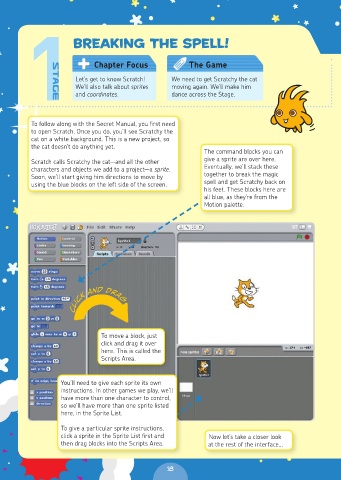
                                                           The command blocks you can
          Scratch calls Scratchy the cat—and all the other   give a sprite are over here.
          characters and objects we add to a project—a sprite.   Eventually, we’ll stack these
          Soon, we’ll start giving him directions to move by   together to break the magic
          using the blue blocks on the left side of the screen.  spell and get Scratchy back on
                                                           his feet. These blocks here are
                                                           all blue, as they’re from the
                                                           Motion palette.


                      Click and Drag


                              To move a block, just
                              click and drag it over
                              here. This is called the
                              Scripts Area.


                  You’ll need to give each sprite its own
                  instructions. In other games we play, we’ll
                  have more than one character to control,
                  so we’ll have more than one sprite listed
                  here, in the Sprite List.

                  To give a particular sprite instructions,
                  click a sprite in the Sprite List first and   Now let’s take a closer look
                  then drag blocks into the Scripts Area.   at the rest of the interface…


                                                 18

