


Page 22 - Super Scratch Programming Adventure -1st Edition
P. 22
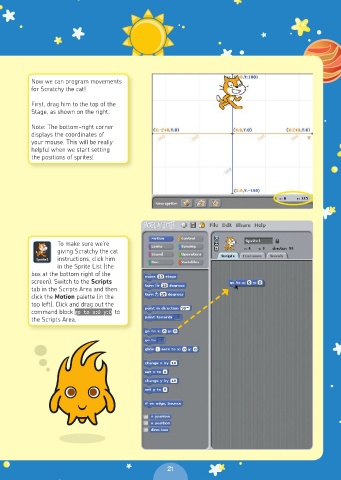
Now we can program movements
          for Scratchy the cat!

          First, drag him to the top of the
          Stage, as shown on the right.

          Note: The bottom-right corner
          displays the coordinates of
          your mouse. This will be really
          helpful when we start setting
          the positions of sprites!


                 To make sure we’re
                 giving Scratchy the cat
                 instructions, click him
                 in the Sprite List (the
          box at the bottom right of the
          screen). Switch to the Scripts
          tab in the Scripts Area and then
          click the Motion palette (in the
          top left). Click and drag out the
          command block go to x:0 y:0 to
          the Scripts Area.


                                                 21

