


Page 116 - Scratch Programming Playground
P. 116
now two different players will be able to play the game
                         using the same keyboard. each cat will be controlled by its
                         own unique keys.
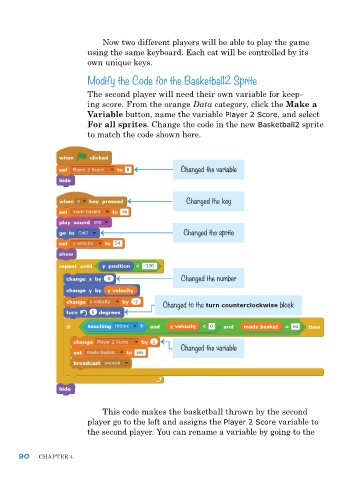
                         Modify the Code for the Basketball2 Sprite


                         The second player will need their own variable for keep-
                         ing score. From the orange Data category, click the Make a
                         Variable button, name the variable Player 2 Score, and select
                         For all sprites. Change the code in the new Basketball2 sprite
                         to match the code shown here.


                                                   Changed the variable


                                                     Changed the key


                                                    Changed the sprite


                                                   Changed the number


                                              Changed to the turn counterclockwise block


                                                   Changed the variable


                             This code makes the basketball thrown by the second
                         player go to the left and assigns the Player 2 Score variable to
                         the second player. you can rename a variable by going to the


      90    ChapTer 4

