


Page 111 - Scratch Programming Playground
P. 111
10. Fix the Scoring Bug


            Did you notice that Player 1 Score increases by several points
            for a single basket? This is a bug, which is a problem that
            makes the program behave in an unexpected way. we’ll need
            to take another careful look at the code to figure out why this
            happens.
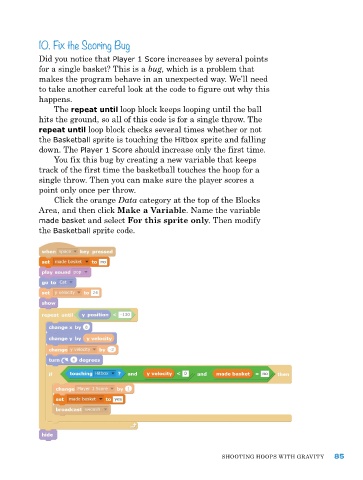
                The repeat until loop block keeps looping until the ball
            hits the ground, so all of this code is for a single throw. The
            repeat until loop block checks several times whether or not
            the Basketball sprite is touching the Hitbox sprite and falling
            down. The Player 1 Score should increase only the first time.
                you fix this bug by creating a new variable that keeps
            track of the first time the basketball touches the hoop for a
            single throw. Then you can make sure the player scores a
            point only once per throw.
                Click the orange Data category at the top of the Blocks
            area, and then click Make a Variable. name the variable
            made basket and select For this sprite only. Then modify
            the Basketball sprite code.


                                                               ShooTIng hoopS wITh gravITy    85

