


Page 65 - MuseScore 2.0 handbook
P. 65
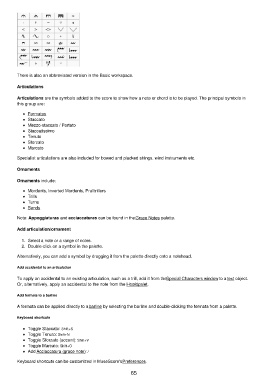
There is also an abbreviated version in the Basic workspace.

         Articulations

         Articulations are the symbols added to the score to show how a note or chord is to be played. The principal symbols in
         this group are:

             Fermatas
             Staccato
             Mezzo-staccato / Portato
             Staccatissimo
             Tenuto
             Sforzato
             Marcato

         Specialist articulations are also included for bowed and plucked strings, wind instruments etc.

         Ornaments

         Ornaments include:

             Mordents, Inverted Mordents, Pralltrillers
             Trills
             Turns
             Bends

         Note: Appoggiaturas and acciaccaturas can be found in the Grace Notes palette.

         Add articulation/ornament

           1.  Select a note or a range of notes.
           2.  Double-click on a symbol in the palette.
         Alternatively, you can add a symbol by dragging it from the palette directly onto a notehead.

         Add accidental to an articulation

         To apply an accidental to an existing articulation, such as a trill, add it from the Special Characters window to a text object.
         Or, alternatively, apply an accidental to the note from the Hoofdpalet.

         Add fermata to a barline

         A fermata can be applied directly to a barline by selecting the barline and double-clicking the fermata from a palette.

         Keyboard shortcuts

             Toggle Staccato: Shift+S
             Toggle Tenuto: Shift+N
             Toggle Sforzato (accent): Shift+V
             Toggle Marcato: Shift+O
             Add Acciaccatura (grace note): /
         Keyboard shortcuts can be customized in MuseScore's Preferences.

                                                           65

