


Page 21 - SALES QUIDE QUICK REF RON
P. 21
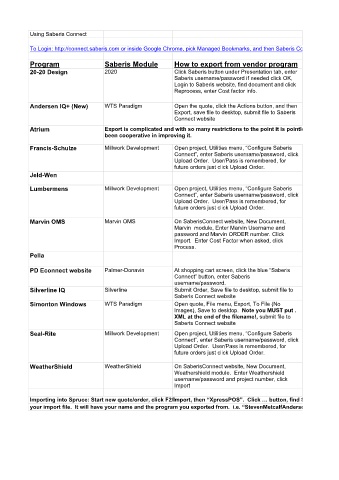
Using Saberis Connect

            To Login: http://connect.saberis.com or inside Google Chrome, pick Managed Bookmarks, and then Saberis Connect


            Program                   Saberis Module          How to export from vendor program
            20-20 Design              2020                    Click Saberis button under Presentation tab, enter
                                                              Saberis username/password if needed click OK,
                                                              Login to Saberis website, find document and click
                                                              Reprocess, enter Cost factor info.

            Andersen IQ+ (New)        WTS Paradigm            Open the quote, click the Actions button, and then
                                                              Export, save file to desktop, submit file to Saberis
                                                              Connect website
            Atrium                    Export is complicated and with so many restrictions to the point it is pointless to use.  Saberis says Atrium has not
                                      been cooperative in improving it.

            Francis-Schulze           Millwork Development    Open project, Utilities menu, “Configure Saberis
                                                              Connect”, enter Saberis username/password, click
                                                              Upload Order.  User/Pass is remembered, for
                                                              future orders just click Upload Order.
            Jeld-Wen

            Lumbermens                Millwork Development    Open project, Utilities menu, “Configure Saberis
                                                              Connect”, enter Saberis username/password, click
                                                              Upload Order.  User/Pass is remembered, for
                                                              future orders just click Upload Order.

            Marvin OMS                Marvin OMS              On SaberisConnect website, New Document,
                                                              Marvin  module, Enter Marvin Username and
                                                              password and Marvin ORDER number. Click
                                                              Import.  Enter Cost Factor when asked, click
                                                              Process.
            Pella

            PD Econnect website       Palmer-Donavin          At shopping cart screen, click the blue “Saberis
                                                              Connect” button, enter Saberis
                                                              username/password.
            Silverline IQ             Silverline              Submit Order, Save file to desktop, submit file to
                                                              Saberis Connect website
            Simonton Windows          WTS Paradigm            Open quote, File menu, Export, To File (No
                                                              Images), Save to desktop.  Note you MUST put .
                                                              XML at the end of the filename!, submit file to
                                                              Saberis Connect website

            Seal-Rite                 Millwork Development    Open project, Utilities menu, “Configure Saberis
                                                              Connect”, enter Saberis username/password, click
                                                              Upload Order.  User/Pass is remembered, for
                                                              future orders just click Upload Order.

            WeatherShield             WeatherShield           On SaberisConnect website, New Document,
                                                              Weathershield module.  Enter Weathershield
                                                              username/password and project number, click
                                                              Import

            Importing into Spruce: Start new quote/order, click F2/Import, then “XpressPOS”.  Click … button, find Saberis Import folder, inside this folder look for
            your import file.  It will have your name and the program you exported from.  i.e. “StevenMetcalfAnderson202005261100.xml”  Select this file, click OK.

