


Page 247 - Basic Course
P. 247
KNX BASIC COURSE


                  3.3  Configuring the local device

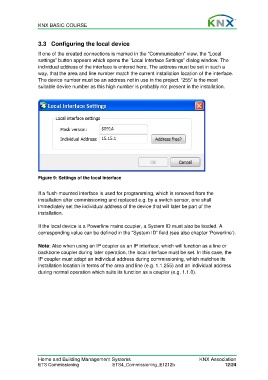
                  If one of the created connections is marked in the “Communication” view, the “Local
                  settings” button appears which opens the “Local Interface Settings” dialog window. The
                  individual address of the interface is entered here. The address must be set in such a
                  way, that the area and line number match the current installation location of the interface.
                  The device number must be an address not in use in the project. “255” is the most
                  suitable device number as this high number is probably not present in the installation.


                  Figure 9: Settings of the local interface


                  If a flush-mounted interface is used for programming, which is removed from the
                  installation after commissioning and replaced e.g. by a switch sensor, one shall
                  immediately set the individual address of the device that will later be part of the
                  installation.

                  If the local device is a Powerline mains coupler, a System ID must also be loaded. A
                  corresponding value can be defined in the “System ID” field (see also chapter ‘Powerline’).

                  Note: Also when using an IP coupler as an IP interface, which will function as a line or
                  backbone coupler during later operation, the local interface must be set. In this case, the
                  IP coupler must adopt an individual address during commissioning, which matches its
                  installation location in terms of the area and line (e.g. 1.1.255) and an individual address
                  during normal operation which suits its function as a coupler (e.g. 1.1.0).


                  Home and Building Management Systems                                    KNX Association
                  ETS Commissioning                ETS4_Commissioning_E1212b                         12/24

