


Page 237 - Advanced Course
P. 237
KNX ADVANCED COURSE


                  2.1.4.3 AND Function with ON and OFF Delay

                  Telegram

                                    1          0                    1            0

                  Switch object     < t e >        < t a >           < t e >           < t a >


                  Logic object    1                      0             1             0


                                           1          0                1             0


                  Output

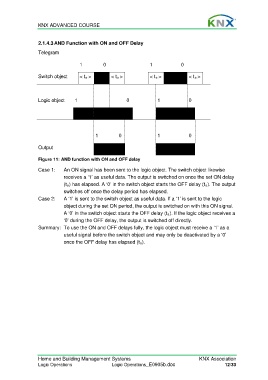
                  Figure 11: AND function with ON and OFF delay

                  Case 1:    An ON signal has been sent to the logic object. The switch object likewise
                             receives a ‘1’ as useful data. The output is switched on once the set ON delay
                             (t e) has elapsed. A ‘0’ in the switch object starts the OFF delay (t a). The output
                             switches off once the delay period has elapsed.
                  Case 2:    A ‘1’ is sent to the switch object as useful data. If a ‘1’ is sent to the logic
                             object during the set ON period, the output is switched on with this ON signal.
                             A ‘0’ in the switch object starts the OFF delay (t a). If the logic object receives a
                             ‘0’ during the OFF delay, the output is switched off directly.
                  Summary:  To use the ON and OFF delays fully, the logic object must receive a ‘1’ as a
                             useful signal before the switch object and may only be deactivated by a ‘0’
                             once the OFF delay has elapsed (t a).


                  Home and Building Management Systems                                    KNX Association
                  Logic Operations                 Logic Operations_E0905b.doc                       12/33

