


Page 23 - NAXT-Product-Guide-web
P. 23
Technology Framework: Clients


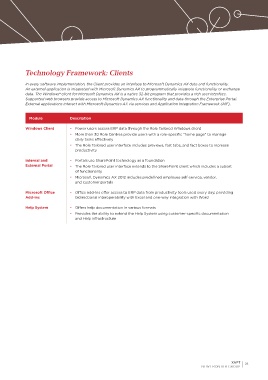
            In every software implementation, the Client provides an interface to Microsoft Dynamics AX data and functionality.
            An external application is integrated with Microsoft Dynamics AX to programmatically integrate functionality or exchange
            data. The Windows® client for Microsoft Dynamics AX is a native 32-bit program that provides a rich user interface.
            Supported web browsers provide access to Microsoft Dynamics AX functionality and data through the Enterprise Portal.
            External applications interact with Microsoft Dynamics AX via services and Application Integration Framework (AIF).


              Module            Description

            Windows Client      •  Power users access ERP data through the Role Tailored Windows client
                                •  More than 30 Role Centres provide users with a role-specific “home page” to manage
                                  daily tasks effectively
                                •  The Role Tailored user interface includes previews, fast tabs, and fact boxes to increase
                                  productivity

            Internal and        •  Portals use SharePoint technology as a foundation
            External Portal     •  The Role Tailored user interface extends to the SharePoint client which includes a subset
                                  of functionality
                                •  Microsoft Dynamics AX 2012 includes predefined employee self-service, vendor,
                                  and customer portals

            Microsoft Office    •  Office add-ins offer access to ERP data from productivity tools used every day; providing
            Add-ins               bidirectional interoperability with Excel and one-way integration with Word

            Help System         •  Offers help documentation in various formats
                                •  Provides the ability to extend the Help System using customer-specific documentation
                                  and Help infrastructure


                                                                                                        XAPT   21
                                                                                          NEW FRONTIER GROUP

