


Page 356 - SK tingkatan 5
P. 356
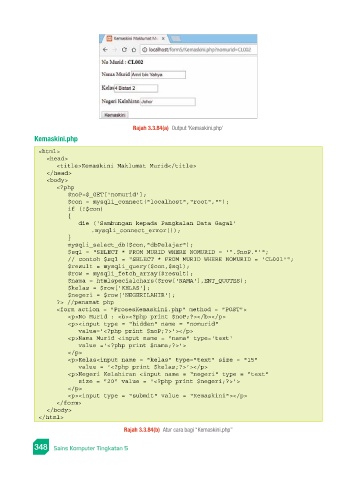
Rajah 3.3.84(a)  Output ‘Kemaskini.php’
                 Kemaskini.php
                  <html>
                    <head>
                        <title>Kemaskini Maklumat Murid</title>
                    </head>
                    <body>
                        <?php
                           $noP=$_GET['nomurid'];
                           $con = mysqli_connect("localhost","root","");
                           if (!$con)
                           {
                              die ('Sambungan kepada Pangkalan Data Gagal'
                                  .mysqli_connect_error());
                           }
                           mysqli_select_db($con,"dbPelajar");
                           $sql = "SELECT * FROM MURID WHERE NOMURID = '".$noP."'";
                           // contoh $sql = "SELECT * FROM MURID WHERE NOMURID = 'CL001'";
                           $result = mysqli_query($con,$sql);
                           $row = mysqli_fetch_array($result);
                           $nama = htmlspecialchars($row['NAMA'],ENT_QUOTES);
                           $kelas = $row['KELAS'];
                           $negeri = $row['NEGERILAHIR'];
                        ?> //penamat php
                        <form action = "ProsesKemaskini.php" method = "POST">
                           <p>No Murid : <b><?php print $noP;?></b></p>
                           <p><input type = "hidden" name = "nomurid"
                              value='<?php print $noP;?>'></p>
                           <p>Nama Murid <input name = "nama" type='text'
                              value ='<?php print $nama;?>'>
                           </p>
                           <p>Kelas<input name = "kelas" type="text" size = "15"
                              value = '<?php print $kelas;?>'></p>
                           <p>Negeri Kelahiran <input name = "negeri" type = "text"
                              size = "20" value = '<?php print $negeri;?>'>
                           </p>
                           <p><input type = "submit" value = "Kemaskini"></p>
                        </form>
                    </body>
                  </html>

                                            Rajah 3.3.84(b)  Atur cara bagi “Kemaskini.php”

                 348   Sains Komputer Tingkatan 5

