


Page 5 - X-Air User's Manual
P. 5
5    X AIR User Manual

        2.  Callouts                                  (1)                      (2)  (3)   (4)

        2.1  X18/XR18 Callouts


                                                                                                 (5)


                                                                                      (6) (7)
                                                 (8)      (9) (10) (11) (12)  (13)  (14)  (15)


                                                                       OUT  IN  PERSONAL
                                                              ETHERNET         MONITORING  5  3  1
                                                                 ACCESS
                                                                 POINT
                                                                   WIFI CLIENT        6  4  2
                                                          USB   REMOTE   MIDI  ULTRANET  AUX SENDS


                      (10)  (12)(11)  (13)  (9)   (14)


               (1)                                                             (16)


                                                                               (7)


                                    (15)                  (2)     (6)                       (8)

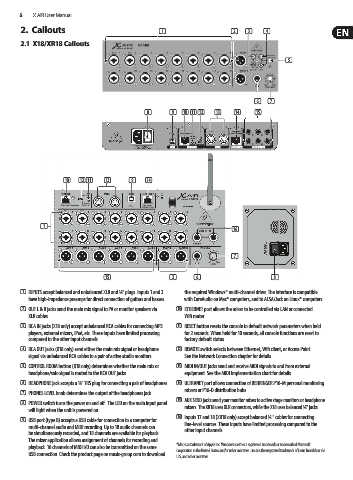
        (1)  INPUTS accept balanced and unbalanced XLR and ¼" plugs. Inputs 1 and 2   the required Windows* multi-channel driver. The interface is compatible
          have high-impedance preamps for direct connection of guitars and basses.  with CoreAudio on Mac* computers, and to ALSA/Jack on Linux* computers.
        (2)  OUT L & R jacks send the main mix signal to PA or monitor speakers via   (10)  ETHERNET port allows the mixer to be controlled via LAN or connected
          XLR cables.                                          Wifi router.
        (3)  RCA IN jacks (X18 only) accept unbalanced RCA cables for connecting MP3   (11)  RESET button resets the console to default network parameters when held
          players, external mixers, iPad, etc. These inputs have limited processing   for 2 seconds. When held for 10 seconds, all console functions are reset to
          compared to the other input channels.                factory default status.
        (4)  RCA OUT jacks (X18 only) send either the main mix signal or headphone   (12)  REMOTE switch selects between Ethernet, Wifi client, or Access Point.
          signal via unbalanced RCA cables to a pair of active studio monitors.  See the Network Connection chapter for details.
        (5)  CONTROL ROOM button (X18 only) determines whether the main mix or   (13)  MIDI IN/OUT jacks send and receive MIDI signals to and from external
          headphone/solo signal is routed to the RCA OUT jacks.  equipment. See the MIDI Implementation chart for details.
        (6)  HEADPHONE jack accepts a ¼" TRS plug for connecting a pair of headphones.  (14)  ULTRANET port allows connection of BEHRINGER P16-M personal monitoring
                                                               mixers or P16-D distribution hubs.
        (7)  PHONES LEVEL knob determines the output of the headphones jack.
                                                            (15)  AUX SEND jacks send your monitor mixes to active stage monitors or headphone
        (8)  POWER switch turns the power on and off . The LED on the main input panel
          will light when the unit is powered on.              mixers. The XR18 uses XLR connectors, while the X18 uses balanced ¼" jacks.
                                                            (16)  Inputs 17 and 18 (XR18 only) accept balanced ¼ " cables for connecting
        (9)  USB port (type B) accepts a USB cable for connection to a computer for   line-level sources. These inputs have limited processing compared to the
          multi-channel audio and MIDI recording. Up to 18 audio channels can   other input channels.
          be simultaneously recorded, and 18 channels are available for playback.
          The mixer application allows assignment of channels for recording and
          playback. 16 channels of MIDI I/O can also be transmitted on the same    *Mac is a trademark of Apple Inc. Windows is either a registered trademark or trademark of Microsoft
          USB connection. Check the product page on music-group.com to download   Corporation in the United States and/or other countries. Linux is the registered trademark of Linus Torvalds in the
                                                            U.S. and other countries

