


Page 6 - X-Air User's Manual
P. 6
6   X AIR User Manual

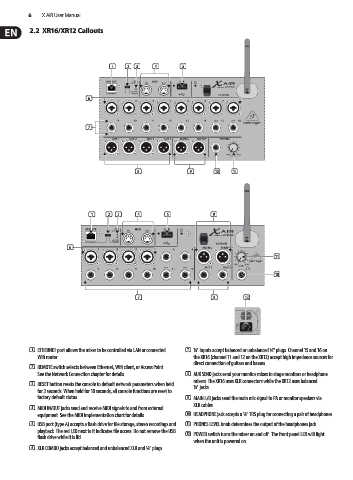
           2.2  XR16/XR12 Callouts


                                     (1)   (2)  (3)  (4)     (5)


                              (6)


                              (7)


                                              (8)               (9)      (10)  (11)


                               (1)  (2) (3)   (4)       (5)             (9)


                       (6)
                                                                                             (11)


                                                                                             (10)


                                              (7)                       (8)        (12)


           (1)  ETHERNET port allows the mixer to be controlled via LAN or connected   (7)  ¼" inputs accept balanced or unbalanced ¼" plugs. Channel 15 and 16 on
             Wifi router.                                         the XR16 (channel 11 and 12 on the XR12) accept high impedance sources for
                                                                  direct connection of guitars and basses.
           (2)  REMOTE switch selects between Ethernet, Wifi client, or Access Point.
             See the Network Connection chapter for details.   (8)  AUX SEND jacks send your monitor mixes to stage monitors or headphone
                                                                  mixers. The XR16 uses XLR connectors while the XR12 uses balanced
           (3)  RESET button resets the console to default network parameters when held   ¼" jacks.
             for 2 seconds. When held for 10 seconds, all console functions are reset to
             factory default status.                           (9)  MAIN L/R jacks send the main mix signal to PA or monitor speakers via
                                                                  XLR cables.
           (4)  MIDI IN/OUT jacks send and receive MIDI signals to and from external
             equipment. See the MIDI Implementation chart for details.  (10)  HEADPHONE jack accepts a ¼" TRS plug for connecting a pair of headphones.
           (5)  USB port (type A) accepts a flash drive for file storage, stereo recordings and   (11)  PHONES LEVEL knob determines the output of the headphones jack.
             playback. The red LED next to it indicates file access. Do not remove the USB
             flash drive while it is lit!                      (12)  POWER switch turns the mixer on and off . The front panel LED will light
                                                                  when the unit is powered on.
           (6)  XLR COMBO jacks accept balanced and unbalanced XLR and ¼" plugs.

