


Page 57 - digitalliteracy
P. 57
2.3  Software: Your Tools for Success


                       Google is able to offer its Drive applications for free because they are open-source software,
                       which means that they can be “freely used, changed, and shared (in modified or unmodified
                       form) by anyone” (Open Source Initiative, n.d., para. 2). Microsoft Office and Apple iWork, on
                       the other hand, are proprietary software, which means they are owned and controlled by
                       their creator. Open-source software has become very popular because it is also used on many
                       mobile devices. When you purchase proprietary software, you do not own it; you are buying
                       a license to use it under certain terms and restrictions (Savage & Vogel, 2009). It is illegal to
                       access, copy, modify, or share proprietary software. For example, if a friend wants a copy of
                       your Microsoft Word software, you would be breaking the law if you copied it or allowed them
                       to do so. This is not the case with open-source software. To learn more about open source
                       software, visit http://www.opensource.org.


                       Saving Your Work in the Cloud


                       Imagine you are writing a final paper for one of your classes. A big winter storm just blew
                       in, and you are afraid your computer might crash. You have been working on this paper for
                       weeks, and you want to make absolutely sure you do not lose it. You can always save your
                       work to a device like a computer hard drive, CD-ROM disk, or a USB memory device/flash
                       drive (be sure to complete the inter-
                       active feature in your e-book if you
                       are unfamiliar with these  methods).
                       Another  option is  to save your  work
                       to cloud storage, or the cloud, which
                       uses the Internet and remote servers
                       to store data. Cloud storage options
                       go by a number of  different names,
                       including OpenDrive, OneDrive, iCloud
                       Drive, Google  Drive, SkyDrive, Just-
                       Cloud, Bitcasa, and Dropbox.


                       Advantages  of cloud storage are that
                       your information is  password pro-
                       tected, you can make sure you always
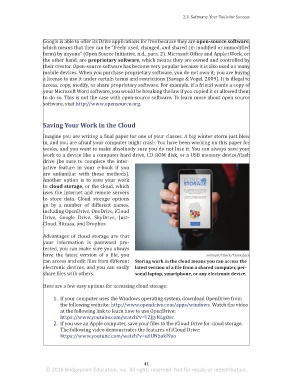
                       have the latest version  of a file, you                             milindri/iStock/Thinkstock
                       can access and edit files from different  Storing work in the cloud means you can access the
                       electronic devices, and you can easily  latest version of a file from a shared computer, per-
                       share files with others.               sonal laptop, smartphone, or any electronic device.

                       Here are a few easy options for accessing cloud storage:

                            1.  If your computer uses the Windows operating system, download OpenDrive from
                              the following website: http://www.opendrive.com/apps/windows. Watch the video
                              at the following link to learn how to use OpenDrive:
                              https://www.youtube.com/watch?v=TZJJyNLgOsc
                            2.  If you use an Apple computer, save your files to the iCloud Drive for cloud storage.
                              The following video demonstrates the features of iCloud Drive:
                              https://www.youtube.com/watch?v=u0UNbakI9ao


                                                                 41
                        © 2016 Bridgepoint Education, Inc. All rights reserved. Not for resale or redistribution.


       sol82612_02_m02_021-046.indd   41                                                                             6/29/16   5:11 PM

