


Page 73 - Computing E-Book Grade 7
P. 73
The City School  2021-2022


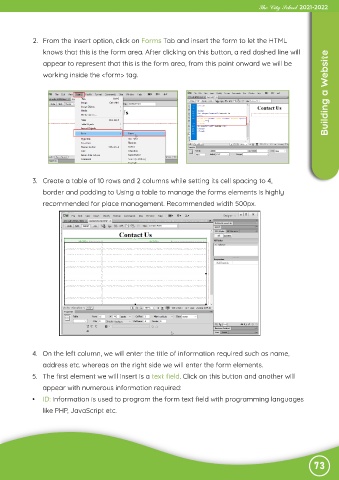
             2.  From the Insert option, click on Forms Tab and insert the form to let the HTML
                knows that this is the form area. After clicking on this button, a red dashed line will
                                                                                                                    Building a Website
                appear to represent that this is the form area, from this point onward we will be
                working inside the <form> tag.


            3.  Create a table of 10 rows and 2 columns while setting its cell spacing to 4,

                border and padding to Using a table to manage the forms elements is highly

                recommended for place management. Recommended width 500px.


            4.  On the left column, we will enter the title of information required such as name,

                address etc. whereas on the right side we will enter the form elements.
            5.  The first element we will insert is a text field. Click on this button and another will

                appear with numerous information required:
            •  ID: information is used to program the form text field with programming languages

                like PHP, JavaScript etc.


                                                                                                               73

