


Page 83 - Computing E-Book Grade 3
P. 83
The City School  2021-2022


           Spreadsheet Interface


                                                                                                                   Analysing Data


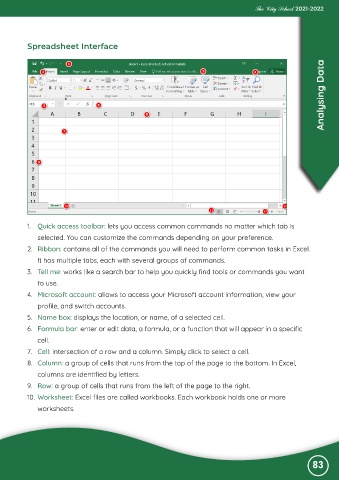
           1.  Quick access toolbar: lets you access common commands no matter which tab is

              selected. You can customize the commands depending on your preference.
           2.  Ribbon: contains all of the commands you will need to perform common tasks in Excel.

              It has multiple tabs, each with several groups of commands.
           3.  Tell me: works like a search bar to help you quickly find tools or commands you want

              to use.
           4.  Microsoft account: allows to access your Microsoft account information, view your

              profile, and switch accounts.
           5.  Name box: displays the location, or name, of a selected cell.

           6.  Formula bar: enter or edit data, a formula, or a function that will appear in a specific
              cell.

           7.  Cell: intersection of a row and a column. Simply click to select a cell.
           8.  Column: a group of cells that runs from the top of the page to the bottom. In Excel,

              columns are identified by letters.
           9.  Row: a group of cells that runs from the left of the page to the right.

           10. Worksheet: Excel files are called workbooks. Each workbook holds one or more
              worksheets.


                                                                                                               83

