


Page 84 - Computing E-Book Grade 3
P. 84
The City School  2021-2022


           11.  Worksheet view options: there are three ways to view a worksheet. Simply click a
              command to select the desired view.

           12. Zoom control: click and drag the slider to use the zoom control. The number to the
              right of the slider reflects the zoom percentage.

           13.  Vertical and horizontal scroll bar: allow to scroll up and down or side to side. To do this,
              click and drag the vertical or horizontal scroll bar.


           6.2.  Understanding Cells


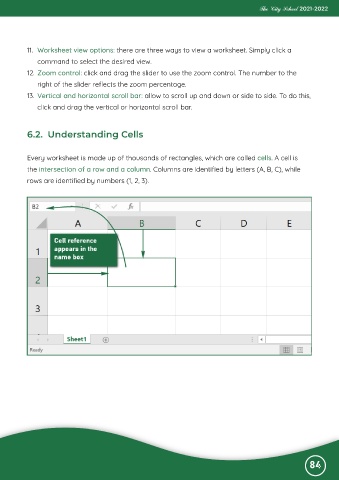
           Every worksheet is made up of thousands of rectangles, which are called cells. A cell is

           the intersection of a row and a column. Columns are identified by letters (A, B, C), while
           rows are identified by numbers (1, 2, 3).


                                                                                                              84

