


Page 368 - Windows 10 May 2019 Update The Missing Manual: The Book That Should Have Been in the Box
P. 368
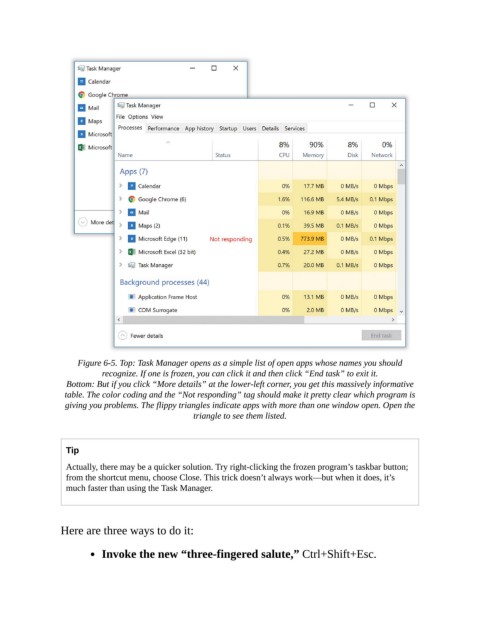
Figure 6-5. Top: Task Manager opens as a simple list of open apps whose names you should
                           recognize. If one is frozen, you can click it and then click “End task” to exit it.

                  Bottom: But if you click “More details” at the lower-left corner, you get this massively informative
                 table. The color coding and the “Not responding” tag should make it pretty clear which program is
                  giving you problems. The flippy triangles indicate apps with more than one window open. Open the
                                                  triangle to see them listed.


                  Tip

                  Actually, there may be a quicker solution. Try right-clicking the frozen program’s taskbar button;
                  from the shortcut menu, choose Close. This trick doesn’t always work—but when it does, it’s
                  much faster than using the Task Manager.


                Here are three ways to do it:

                           Invoke the new “three-fingered salute,” Ctrl+Shift+Esc.

